
Are computer wrist supports worth it? It depends on your wrists, and on how you use the support once it’s on your desk. If you spend hours typing or mousing and your hands have started to ache, tingle, or go numb, it’s tempting to throw $20 at a keyboard wrist rest and call it fixed. Sometimes that’s the right call. Other times you’ve bought a cushion that adds pressure right where you don’t want it.
First, figure out whether you’re dealing with mild soreness, carpal tunnel-like symptoms, or plain prevention. Then see how keyboard rests, mouse pads, and splint-style braces differ, and which symptoms mean it’s time to see a doctor.
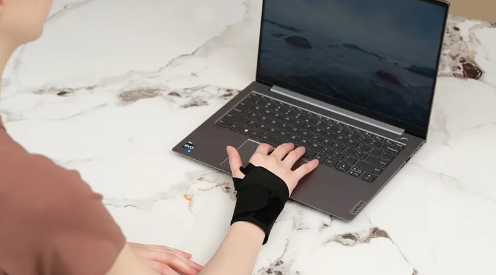
Mild Soreness, Carpal Tunnel-Like Symptoms, or Pure Prevention: Are Computer Wrist Supports Worth It?
Your symptoms determine whether a brace is worth buying.
| Situation | Worth buying? | What to do |
| No symptoms | Low | Skip routine wear. Adjust keyboard and mouse height. |
| Occasional soreness, no numbness | Medium | Cheap, flexible support, short-term use. |
| Night numbness or tingling | Higher | Neutral night splint, several weeks. |
| Daytime numbness or weak hands | Don’t just buy a brace | Get a medical evaluation. |
| Worsening for weeks | Don’t self-treat long-term | Rule out carpal tunnel syndrome, neck, or tendon issues. |
Who benefits most
A night splint helps if you wake up needing to shake out your hands, ache after hours on a keyboard or phone, or have mild symptoms without constant numbness. It also serves as a reliable drug-free option during pregnancy.
The splint maintains a neutral wrist position while you sleep. Avoid designs that bend the wrist backward.
What the evidence says
- Clinical reviews show limited short-term benefit for carpal tunnel syndrome, particularly during the first three months. In some cases, a brace performs no better than doing nothing.
- One small, low-quality study of 80 people found night-splint users were roughly 3.86 times more likely to report overall improvement.
- Reviews support splints for short-term relief from mild to moderate symptoms. Wearing a brace only at night works about as well as wearing one all day, and it is far easier to tolerate.
- Any relief may be temporary. Some people see no change, and symptoms can return once you stop using the brace.
What to look for
- Position: Neutral, keeping the wrist flat rather than bent up or down.
- Support: Removable or flexible stays that leave your fingers free to move.
- Fit: Snug without cutting off circulation. Pale, cold, swollen, or numb fingers mean the strap is too tight.
- Material: Breathable, washable fabric with soft edges and straps you can fasten with one hand.
- Sizing: Check whether the model fits the left hand, right hand, or either, and measure your wrist before ordering.
- Skip: Heating elements, magnets, heavy compression, and built-in electronics.
Wear the brace only at night. Keeping your wrist immobilized for long stretches during the day can stiffen joints and weaken surrounding muscles.
Keyboard Rests, Mouse Pads, and Wrist Splints: How to Choose

Each type of wrist support solves a different problem. Match the product to your problem and skip the rest.
| Type | Best for | Key specs | What it can’t do |
| Keyboard wrist rest | Long typing sessions, palm pressing on the desk edge | Covers the keyboard length, sits near the front edge height, non-slip base | Hold your wrist still or treat carpal tunnel syndrome |
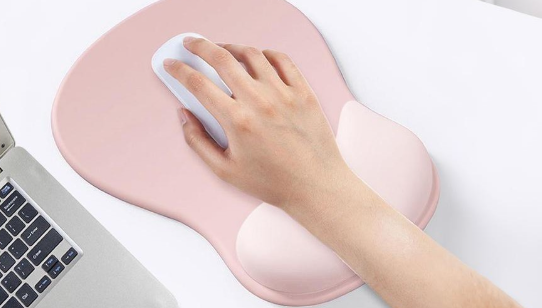
| Mouse wrist pad | Hard desks, palm friction, hours of mousing | 20-30 cm wide, 15-25 mm thick, rounded edges | Fix a bent wrist or a floating forearm |
| Wrist splint | Night numbness, suspected carpal tunnel, sprains, post-surgery | Adjustable straps, palm or back stay, free fingers | Replace a diagnosis, or work as a daytime desk rest |
Keyboard wrist rest
The top surface should sit level with the front of your keyboard or just below it. If it sits too high, your wrist stays bent backward.
- Length: 44-48 cm for full-size boards, 35-37 cm for 87-key boards.
- Gel or slow-rebound foam: Comfortable and relieves pressure well, though it can trap heat.
- Memory foam wrist rest: Soft and mid-priced, good for long sessions.
- Wood or hard plastic: Stable and easy to clean. Make sure the edges are rounded.
- Leather or PU: Looks clean, but check for cracking, peeling, and breathability.
Mouse wrist pad
This earns its keep if your desk is hard, your palm rubs, or your mouse pad feels rough. Go 20-25 cm wide for everyday office work. Pick a 25-30 cm pad if you run a low-DPI mouse and make wide arm sweeps.
Thicker is not better. Anything over 25 mm props your wrist backward. Soft, flat pads suit most setups. Memory foam offers more cushion, but it tends to pack down over time. Hard, tall pads usually create uncomfortable pressure points.
Run a quick check while working. Your forearm should glide cleanly side to side. If the pad edge digs into your wrist crease or your palm goes numb, swap it for a lower or wider model. Set the height for your keyboard and mouse on their own terms rather than propping both on one tall pad.
Wrist splint
This is the only option of the three that immobilizes your joint. Aim for 0-15° of extension, keeping the wrist as flat as possible. Many off-the-shelf splints lock you in at 10-30°, and carpal tunnel pressure can rise once you pass 20°. Check the angle before you wear it, and bend the internal stay to flatten it out if needed.
Choose a splint with 2-3 adjustable straps, full finger mobility, clear left- or right-hand sizing, and a palm stay that runs down your forearm without digging into your palm crease. If your numbness gets worse, pain spreads, or you wake up repeatedly, loosen the straps or take it off.
Quick pick
- Typing fatigue: keyboard wrist rest.
- Palm soreness while mousing: mouse wrist pad.
- Night tingling: neutral wrist splint.
- Numbness lasting weeks or weaker grip: see a doctor before buying anything.
3 Free Ways to Ease Wrist Pain Without Buying a Brace
You can start calming wrist pain today by clearing out daily strain and adding light movement rather than buying new gear. Start with these three steps.
1. Cut back the triggers, but keep moving
Ease off the tasks that provoke the ache, such as heavy gripping, push-ups, repeated twisting, and marathon keyboard or mouse sessions. Keep up with everyday, low-effort activities like eating and washing dishes.
- Move every hour. About once per waking hour, move your wrist gently for 10-20 seconds. Never stretch through pain, and don’t clench your fist.
- Don’t go fully still. Total rest can add stiffness and slow recovery.
- Fix your desk habits. Rest your forearms on the desk and pull your mouse and keyboard close. Keep a neutral wrist position rather than bending your hands up or tilting them sideways.
2. Ice it, with a towel in between
- Wrap an ice pack or a bag of frozen peas in a towel.
- Apply it for up to 20 minutes, every 2-3 hours.
- Use it first for a fresh sprain, swelling, or pain after activity.
- No ice pack? A plastic bag of cold water works.
- Never put ice directly on your skin. Skip numb areas, broken skin, and open wounds.
- Stop right away if you feel burning.
3. Do gentle range-of-motion moves
- Flexion and extension: Rest your forearm on the desk with your palm hanging off the edge. Move only your wrist, slowly up and then down. Hold each direction for 10 seconds, 10 times.
- Rotation: Bend your elbow and tuck it close to your body. Slowly turn your palm up, then down. Hold each direction for 10 seconds.
- Frequency: Do 2-4 rounds a day. You should feel a light pull, nothing more. Pain, numbness, or swelling should not increase.
If symptoms flare after exercising, shrink the range, cut the reps, and go back to relative rest and icing.
When free fixes aren’t enough
See a doctor right away if you notice:
- Visible deformity
- Inability to move your wrist or hold objects
- Constant numbness or weakness
- Severe swelling
- Symptoms that keep worsening despite self-care
Symptoms That Mean Stop Self-Treating and See a Doctor
Some symptoms mean the brace is no longer helping, and a few mean it may be making things worse. If any of these show up, take the wrist support off and get checked by a doctor.
See a doctor if you notice:
- Numbness, lingering tingling, pins and needles, or dulled feeling in your fingers or wrist. Pay close attention if your thumb feels weak, your grip drops, or the feeling worsens over time. These are classic signs that carpal tunnel syndrome may be progressing.
- Fingers that turn white, blue, or cold, or pain and numbness that increase after you put the wrist splint on. The brace may be cutting off your circulation. Loosen or take it off right away.
- Swelling, heat, redness, or tenderness, especially if you also have a fever, chills, or generally feel sick. A doctor needs to check for infection or acute inflammation.
- Pain after a fall or impact, along with heavy swelling, bruising, trouble moving the joint, a visible deformity, or a popping sound when it happened. A brace cannot protect you from a fracture or a torn ligament.
- Severe or constant pain, including pain that wakes you up at night, keeps getting worse, or keeps returning. Support alone will not solve this.
- Skin damage from the brace, such as blisters, chafing, deep indentations, color changes, or raw spots. Take the brace off and check the fit, strap pressure, and your skin before wearing it again.
- No improvement after about two weeks, or symptoms that get in the way of daily tasks. Some guidelines allow 3-6 weeks for mild strain to settle, but do not wait that long if you notice numbness or weakness.
Go to the emergency room now if:
- You suddenly lose feeling or strength in your hand.
- Your wrist or fingers look deformed or discolored.
- Your fingers are cold, white, or blue.
- You have a severe injury, an open wound, or exposed bone.
- You have intense pain and cannot move your wrist or fingers at all.
While you wait for care
Do not tighten the brace. If numbness, discoloration, coldness, or pain gets worse, take the support off and rest your hand in a comfortable position. Note down when the symptoms started and whether wearing the brace seems to trigger them. Your doctor will need that information.
Conclusion
Computer wrist supports only help in the right setup. A keyboard wrist rest or mouse pad earns its place on your desk if you support the heel of your palm during pauses. Leaning on it while you type adds strain, and padding alone will not cure existing pain.
For a computer wrist support manufacturer to enrich your brand or product line? Contact AOFIT now.